TYPE

UI/UX, Redesign

DURATION

5 WEEKS

MY ROLE

Solo Project

INTRODUCTION

Meetup is a social app that connects people through local events based on shared interests. Users can join or host activities such as workshops, social gatherings, or fitness groups.

CONTEXT AND SCOPE

Although a city is bustling with excitement around events, there are few who feels that they are always finding out about events after they happen, or never finds about it at all! Meetup exists to connect the dots between these events and people.

Features Offered by Meetup

Find events

Find events that appeal to you, whether it is networking, creative and fitness-oriented.

Join interest groups

Join groups of your interests that hold regular events.

Organize events

Organize your own events, and find your people.

It is a one-stop app for the user to browse and join various events happening in and around their location. The app gives visibility to small events and a wider reach to bigger events.

…yet, are these events too many taps away?

USER FLOW PAIN POINTS

The current user flow of exploring and searching for events nearby, which is one of the primary functions, is convoluted. The process involves multiple clicks, unclear navigation, and excessive scrolling.

Homescreen

Homescreen

Explore

Explore

Search for events

Search for events

Events list

Events list

Apply filter on events

Apply filter on events

Event details

Event details

Search for group

Search for group

Change location

Change location

No events

No events

Browse categories

Browse categories

Are there events related to the keyword?

Are there events related to the keyword?

Choose through filters

Choose through filters

Choose from list of events

Choose from list of events

Click on event

Click on event

End

End

Type keyword

Type keyword

No suggested events in explore page

No suggested events in explore page

Pain Point

Pain Point

Filters only after search results appear

Filters only after search results appear

Pain Point

Pain Point

Different search bar for group

Different search bar for group

Pain Point

Pain Point

HEURISTIC EVALUATION

I performed a systematic assessment of the current interface against Nielsen's 10 usability heuristics, identifying key violations and their impact on user experience.

Visibility of System Status

Match Between System and Real World

Match Between System and Real World

User Control and Freedom

User Control and Freedom

Consistency and Standards

Consistency and Standards

Error Prevention

Error Prevention

Recognition Rather than Recall

Flexibility and Efficiency of Use

Aesthetic and Minimal Design

Help Users with Errors

Help and Documentation

Recognition Rather than Recall

Flexibility and Efficiency of Use

Aesthetic and Minimal Design

Help Users with Errors

Help and Documentation

Home

There is a lack of clear text hierarchy and a poor application of Gestalt principles, which makes it difficult for users to understand the content structure.

Aesthetic and Minimal Design

The interface relies heavily on text-based recall for accessing functions, requiring heavier mental effort for navigation.

Recognition rather than recall

The app doesn't align with established conventions and user mental models. Most event/content apps follow the pattern of showing discovery content first because that's what users have learned to expect and what matches their primary goal (finding events to attend).

Match Between System & Real World

The Explore page lacks visible filtering options at the entry point, requiring users to navigate further into the flow before they can refine results. This adds unnecessary friction to the browsing experience and makes it harder for users to quickly find relevant content.

User Control & Freedom

Users expect similar elements to behave in similar ways. Having two different search buttons for similar tasks (finding something within the app) can create inconsistency in the interface, especially if their placement, appearance, or behavior deviates from standard search conventions.

Consistency and Standards

Explore

Filters

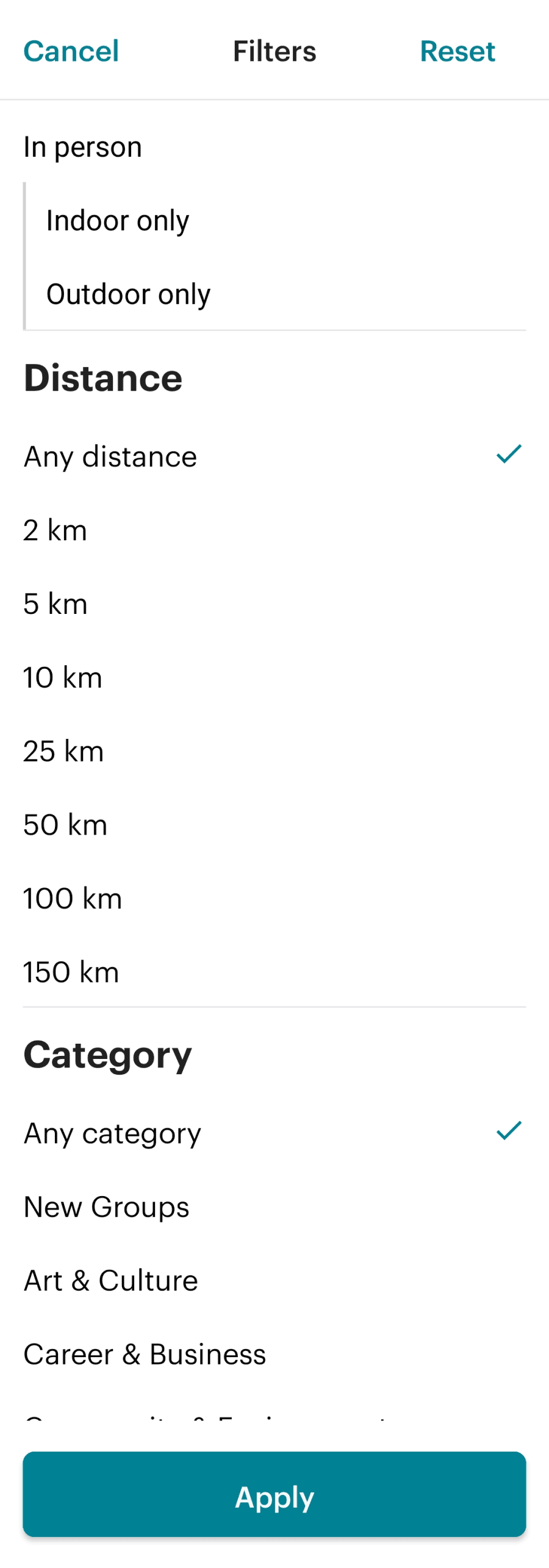
The distance options restricts users to a limited set of choices, which may not align with their actual preferences or needs. Replacing it with a slider picker enhances flexibility, allowing users to select a more precise distance quickly and intuitively.

Flexibility and Efficiency of Use

A long, unorganized list of filters contains information that competes for the user's attention, making it harder to identify the most relevant options. The interface should prioritize or organize filters rather than presenting an overwhelming list.

Aesthetic and Minimal Design

Two different formats for dates for a one-time event and an event series. This causes the user extra effort to identify crucial information such as event date, due to their expectation in consistent design not being met.

Consistency and Standards

Important action such as saving and sharing an event is given neutral colours instead of brand colours. This fails to signify the CTAs as such.

Consistency and Standards

Search Results

Home

The interface relies heavily on text-based recall for accessing functions, requiring heavier mental effort for navigation.

Recognition rather than recall

The app doesn't align with established conventions and user mental models. Most event/content apps follow the pattern of showing discovery content first because that's what users have learned to expect and what matches their primary goal (finding events to attend).

Match Between System & Real World

There is a lack of clear text hierarchy and a poor application of Gestalt principles, which makes it difficult for users to understand the content structure.

Aesthetic and Minimal Design

The Explore page lacks visible filtering options at the entry point, requiring users to navigate further into the flow before they can refine results. This adds unnecessary friction to the browsing experience and makes it harder for users to quickly find relevant content.

User Control & Freedom

Explore

Users expect similar elements to behave in similar ways. Having two different search buttons for similar tasks (finding something within the app) can create inconsistency in the interface, especially if their placement, appearance, or behavior deviates from standard search conventions.

Consistency and Standards

Filters

A long, unorganized list of filters contains information that competes for the user's attention, making it harder to identify the most relevant options. The interface should prioritize or organize filters rather than presenting an overwhelming list.

Aesthetic and Minimal Design

The distance options restricts users to a limited set of choices, which may not align with their actual preferences or needs. Replacing it with a slider picker enhances flexibility, allowing users to select a more precise distance quickly and intuitively.

Flexibility and Efficiency of Use

Important action such as saving and sharing an event is given neutral colours instead of brand colours. This fails to signify the CTAs as such.

Consistency and Standards

Search Results

Two different formats for dates for a one-time event and an event series. This causes the user extra effort to identify crucial information such as event date, due to their expectation in consistent design not being met.

Consistency and Standards

COMPETITOR ANALYSIS

I evaluated how Meetup’s competitors, Eventbrite and Bookmyshow, defined the Explore and Search user flow, analyzing each step of the flow.

Feature

Feature

Meetup

Meetup

Eventbrite

Eventbrite

Bookmyshow

Bookmyshow

Explore and Search for Events

Explore and Search for Events

Home page gives a profile overview with the user’s saved events, groups, interests and calendar. Search is accessed through the “Explore” page in the nav-bar. These choices slows down event discovery.

Home page gives a profile overview with the user’s saved events, groups, interests and calendar. Search is accessed through the “Explore” page in the nav-bar. These choices slows down event discovery.

Home page offers suggested events for users to explore through. Searching is given high priority by placing a search option in the nav-bar as well as a CTA in the home page.

Home page offers suggested events for users to explore through. Searching is given high priority by placing a search option in the nav-bar as well as a CTA in the home page.

Home page offers strong event discovery options in various categories, and filters to reach these categories. Search is CTA on top.

Home page offers strong event discovery options in various categories, and filters to reach these categories. Search is CTA on top.

Filtering Search Results

Filtering Search Results

Filters appear after search results, and are lengthy and flat, in the form of a list. This causes decision fatigue instead of aiding decision making.

Filters appear after search results, and are lengthy and flat, in the form of a list. This causes decision fatigue instead of aiding decision making.

Filter options is upfront in search and the options are cohesive. The number of filters applied is shown after results, and the number of results for the specific filter.

Filter options is upfront in search and the options are cohesive. The number of filters applied is shown after results, and the number of results for the specific filter.

Filters appear after search results, and is a lengthy list similar to Meetup.

Filters appear after search results, and is a lengthy list similar to Meetup.

Event details

Event details

Event details are comprehensive and straight to point.

Event details are comprehensive and straight to point.

Event details are comprehensive and straight to point.

Event details are comprehensive and straight to point.

Event details are comprehensive and straight to point.

Event details are comprehensive and straight to point.

Viewing Saved Events

Viewing Saved Events

Viewing saved events is given high priority and is easily accessible through home page.

Viewing saved events is given high priority and is easily accessible through home page.

Liked events have a spot in the nav-bar, making access quick.

Liked events have a spot in the nav-bar, making access quick.

There is no option to save or like events. This forces the user to book an event then, or it relies on them remembering information to come back to it again.

There is no option to save or like events. This forces the user to book an event then, or it relies on them remembering information to come back to it again.

REIMAGINED EXPLORE AND SEARCH USER FLOW

I came up with a new way for the user to explore and search for events, prioritizing suggested events, simplifying search and giving intuitive filter options early in the flow

Original Explore and Search User Flow

Homescreen

Homescreen

Explore

Explore

Search for events

Search for events

Events list

Events list

Apply filter on events

Apply filter on events

Event details

Event details

Search for group

Search for group

Change location

Change location

No events

No events

Browse categories

Browse categories

Are there events related to the keyword?

Are there events related to the keyword?

Choose through filters

Choose through filters

Choose from list of events

Choose from list of events

Click on event

Click on event

End

End

Type keyword

Type keyword

No suggested events in explore page

No suggested events in explore page

Pain Point

Pain Point

Filters only after search results appear

Filters only after search results appear

Pain Point

Pain Point

Different search bar for group

Different search bar for group

Pain Point

Pain Point

Reimagined User Flow

Apply more filters

Apply more filters

Event details

Event details

Choose from list of events

Choose from list of events

Click on event

Click on event

End

End

Are there events related to the keyword/filters?

Are there events related to the keyword/filters?

Apply Filters

Apply Filters

Type keyword

Type keyword

Home screen-

Explore Events

Home screen-

Explore Events

Search

Search

Events list

Events list

No events

No events

Explore events from home

Explore events from home

Design Decision

Design Decision

Filters appear in the search screen for more effective filtering

Filters appear in the search screen for more effective filtering

Design Decision

Design Decision

Global search bar for events and groups

Global search bar for events and groups

Design Decision

Design Decision

REDESIGNED SCREENS

Home

Before

After

Priority is given to exploring events through categorical filters and suggested events. This enhances event visibility by helping the user make quicker decisions, compared to seeking out events.

Design Decision

The global search button for groups and events, is given prominence.

Design Decision

Search

Before

After

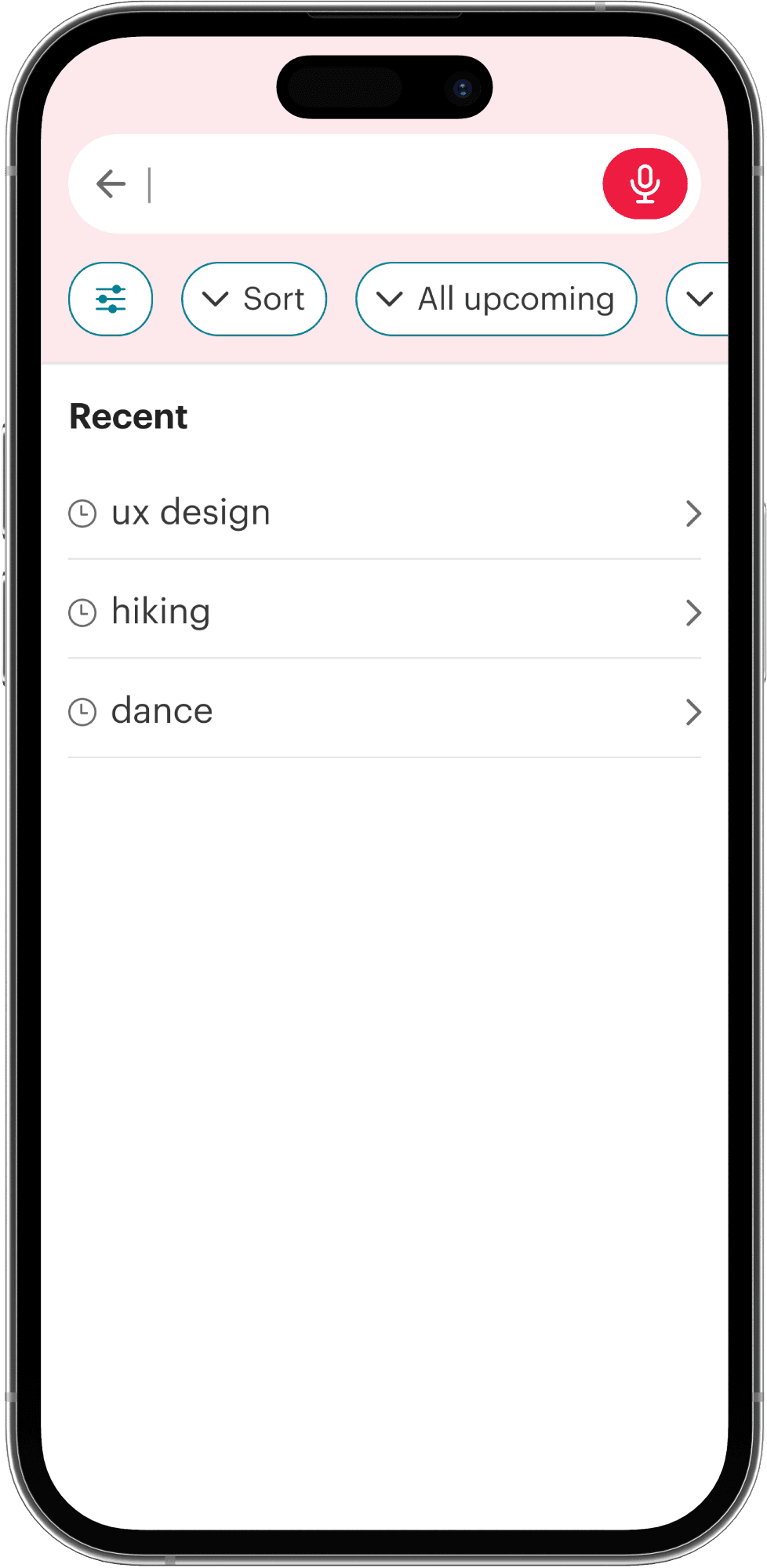
Adding a voice search option makes the interface more accessible.

Design Decision

Users searching for events often have specific criteria in mind. Adding filters earlier in the flow, reduces the number of steps to find a match.

Design Decision

Filters

Before

Reset

After

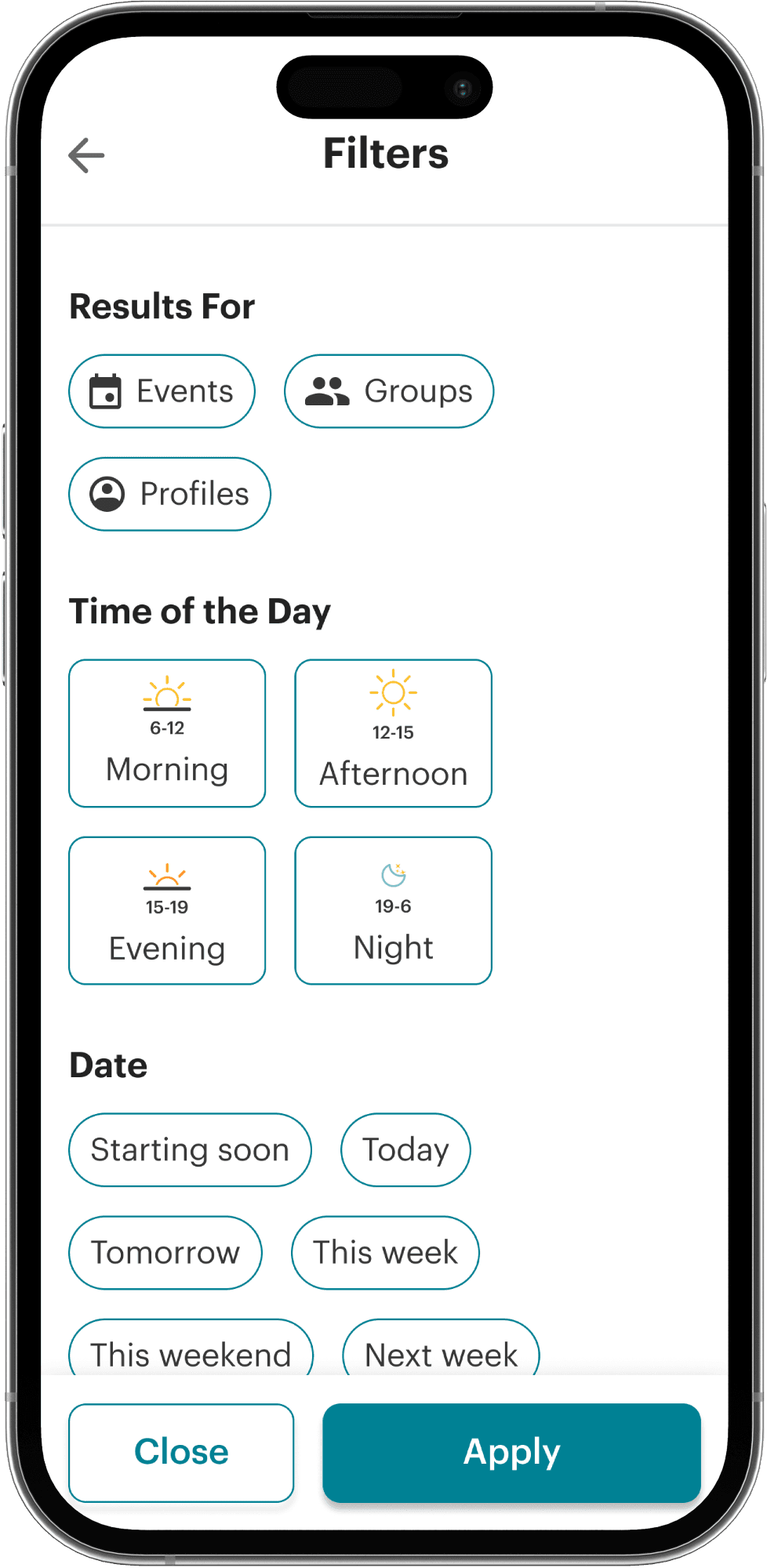
Close button has been moved to the bottom, to be able to easily access it through hand.

Design Decision

Distance has been changed to a slider, which is more intuitive and familiar to the user.

Design Decision

Filters are redesigned to make them easier to scan through and select, selected options are highlighted in a more visible way.

Design Decision

Search Results

Before

After

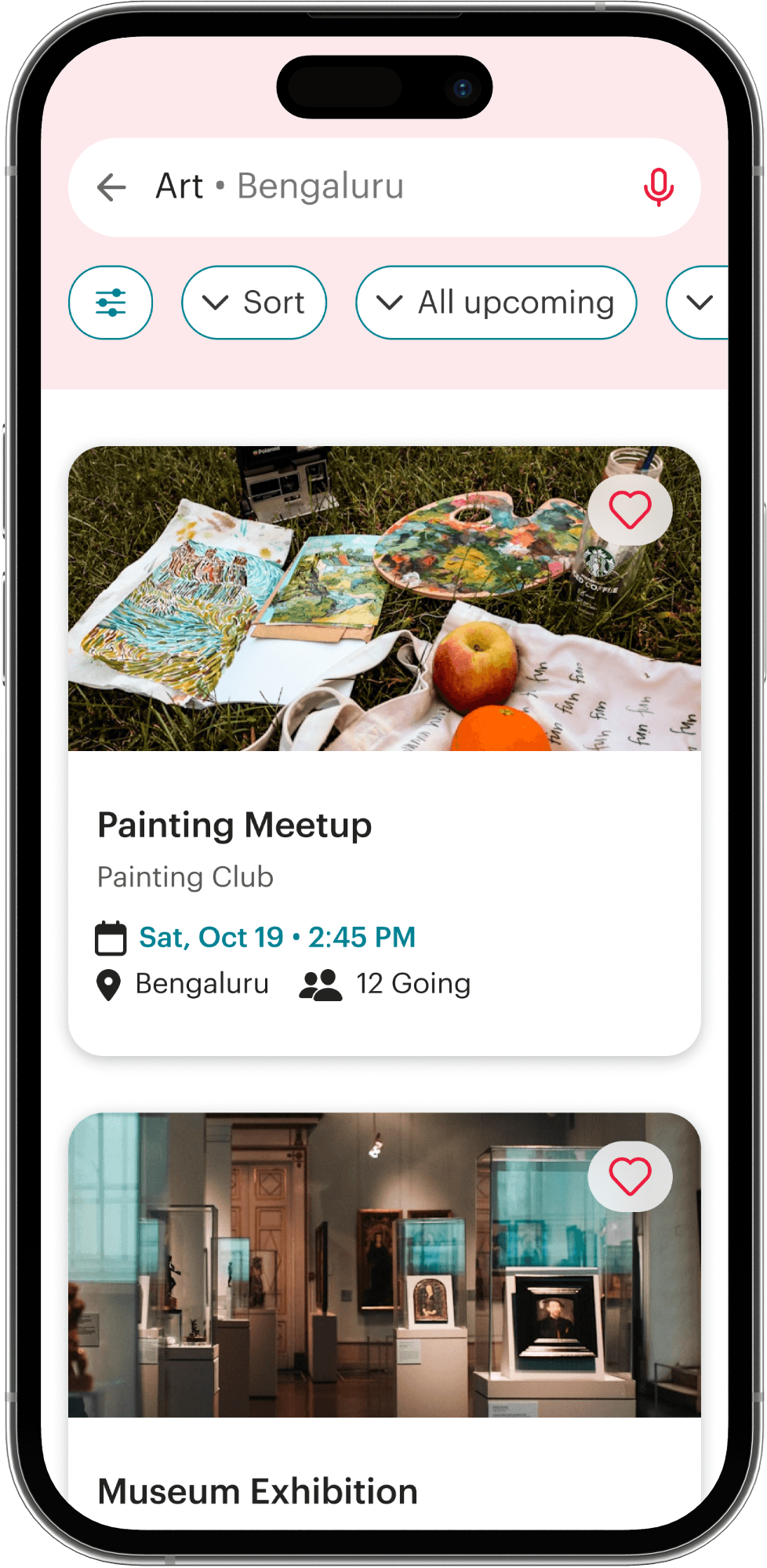
Event card is less cluttered and important information is easier to take in.

Design Decision

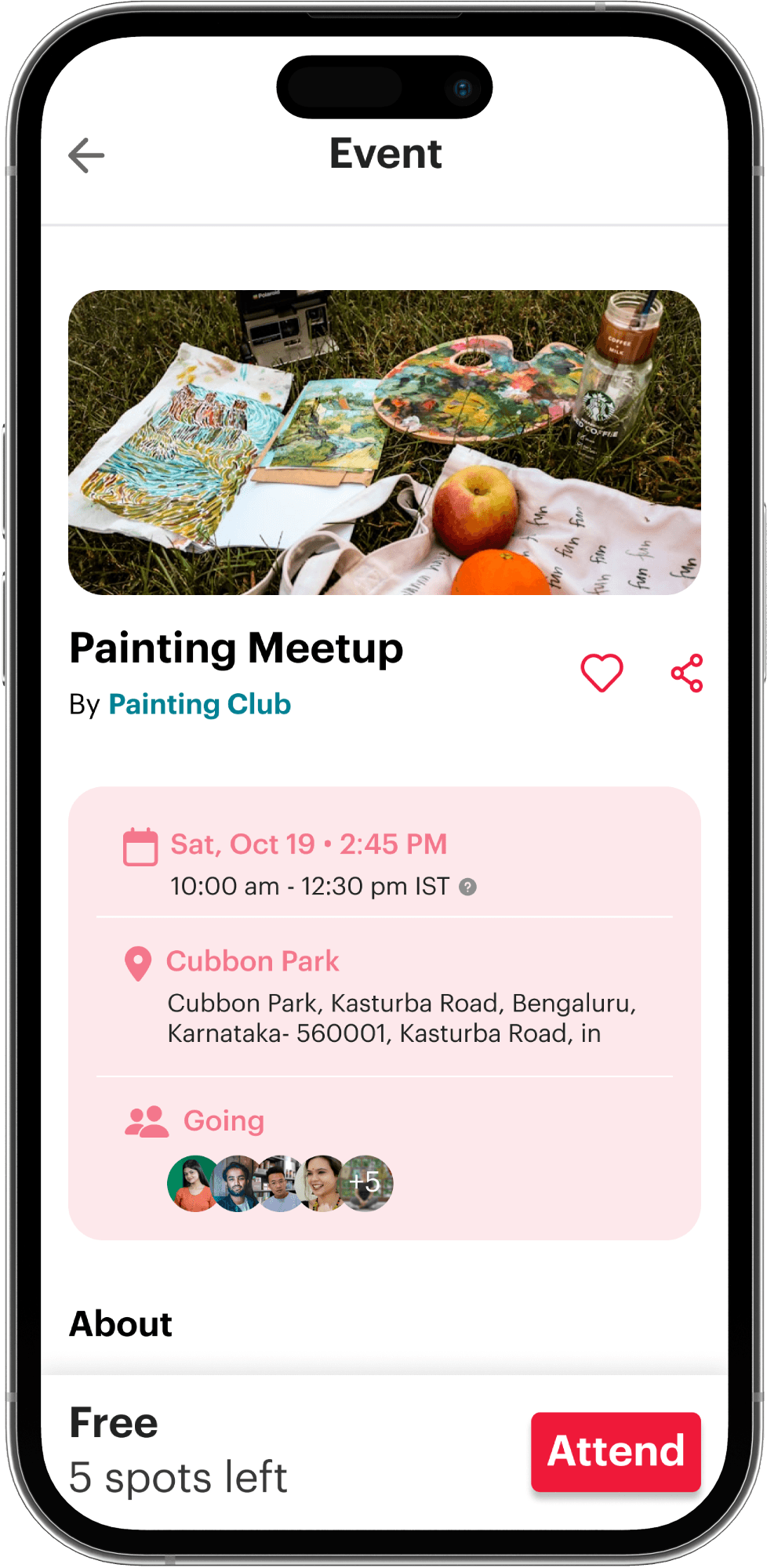
Event Details

Before

After

Crucial event details are framed and given focus.

Design Decision

Profile

Before

After

Since the home is reimagined as an explore page, the events you are attending and liked are moved to the profile. This closely aligns with user expectations as well.

Design Decision

Home

Before

After

Priority is given to exploring events through categorical filters and suggested events. This enhances event visibility by helping the user make quicker decisions, compared to seeking out events.

Design Decision

The global search button for groups and events, is given prominence.

Design Decision

Search

Before

After

Adding a voice search option makes the interface more accessible.

Design Decision

Users searching for events often have specific criteria in mind. Adding filters earlier in the flow, reduces the number of steps to find a match.

Design Decision

Filters

Before

Reset

After

Close button has been moved to the bottom, to be able to easily access it through hand.

Design Decision

Distance has been changed to a slider, which is more intuitive and familiar to the user.

Design Decision

Filters are redesigned to make them easier to scan through and select, selected options are highlighted in a more visible way.

Design Decision

Search Results

Before

After

Event card is less cluttered and important information is easier to take in.

Design Decision

Event Details

Before

After

Crucial event details are framed and given focus.

Design Decision

Profile

Before

After

Since the home is reimagined as an explore page, the events you are attending and liked are moved to the profile. This closely aligns with user expectations as well.

Design Decision

PROTOTYPES

Explore and Search

Profile

REFLECTIONS

While redesigning involves working the existing concept of the app to improve experience, reimagining helped me to think outside the box of the existing concept and look at the user experience in a fresh perspective. I re-evaluated the constraints and challenged Meetup's core interaction model and asked myself, what if it didn't have to be this way.

I worked on this project during October 2024, and since then Meetup have made great efforts to improve their UI and UX and now offers a smoother experience. Some of the changes aligned with my visions, such as prioritizing event discovery once you open the app. Their own redesign helped me understand how an app could reinvent itself.

Thank You

Thank You

Let’s Connect!

kalyaniarayarath@gmail.com

Copied

Let’s Connect!

kalyaniarayarath@gmail.com

Copied

Create a free website with Framer, the website builder loved by startups, designers and agencies.